
What are statecharts? State chart examples
Statecharts extend state machines with nested states, parallel states, and history. Learn state chart notation with visual examples and executable XState code.
A statechart describes how something behaves, using states, events, and transitions. It extends a finite state machine with nested states, parallel states, and history, so you can describe complex behavior without drawing every possible combination of states.
You might also see it written as state chart. Both spellings refer to the same idea.
Think about a music player. It can be playing or paused. While it's playing, it might be buffering. Its volume can be muted or unmuted independently of playback. A statechart lets you describe those relationships directly.
You can use statecharts to model a user interface, a backend workflow, an embedded device, or an AI agent. The useful question is the same: What can happen next, given what's happening now?
A statechart example
Let's start with a dog. The dog can be asleep or awake. Waking up changes the state from asleep to awake. Falling asleep changes it back.
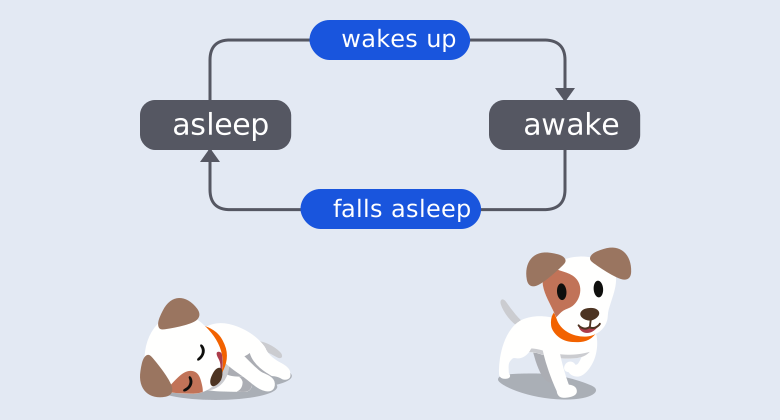
Explore the sleeping dog in Stately (sign-in required)
This hosted example is read-only and requires Stately sign-in. The diagram above stays available without an account or if the interactive view cannot load. Open the example in a new tab.
This small example is also a finite state machine. You don't need nesting or parallel states for every problem. Those features become useful when the behavior grows.
How to read a state chart
Start at the initial state, then follow the arrows for the events that occur.
| Notation | Meaning | Example |
|---|---|---|
| A box with a name | A state: a situation the system can be in | Asleep, loading, awaiting approval |
| An arrow | A transition between states | Loading to success |
| A label on an arrow | The event that can trigger that transition | RETRY, APPROVE, PLAY |
| A filled circle with an arrow | The initial state | Start in asleep |
| A box containing other states | A compound state, also called a parent state | Playing contains buffering and ready |
| Regions separated by a dashed line | Parallel regions that are active together | Playback and volume |
| A final-state marker | Completion of a machine or a region | An order is complete |
A history marker, often H or H* | Remembered state when reentering a parent | Resume the checkout step you left |
Statechart tools use slightly different drawing styles. Stately uses labeled boxes and event labels on transitions. The behavior matters more than the exact shape of a box.
A guard is a condition that determines whether a transition is allowed. An action is work performed when a transition occurs or a state is entered or exited. For example, SUBMIT can require a valid address before entering payment, and entering payment can request a payment session.
An event does not have to change the state. If the current state has no applicable transition for that event, the machine can ignore it.
Nested states: describe what's happening inside a state
Now take the dog for a walk. The dog starts waiting, enters on a walk when you leave home, and reaches walk complete when you arrive home.
While on a walk, the dog can be walking, running, or stopping to sniff good smells. Those are child states of on a walk.
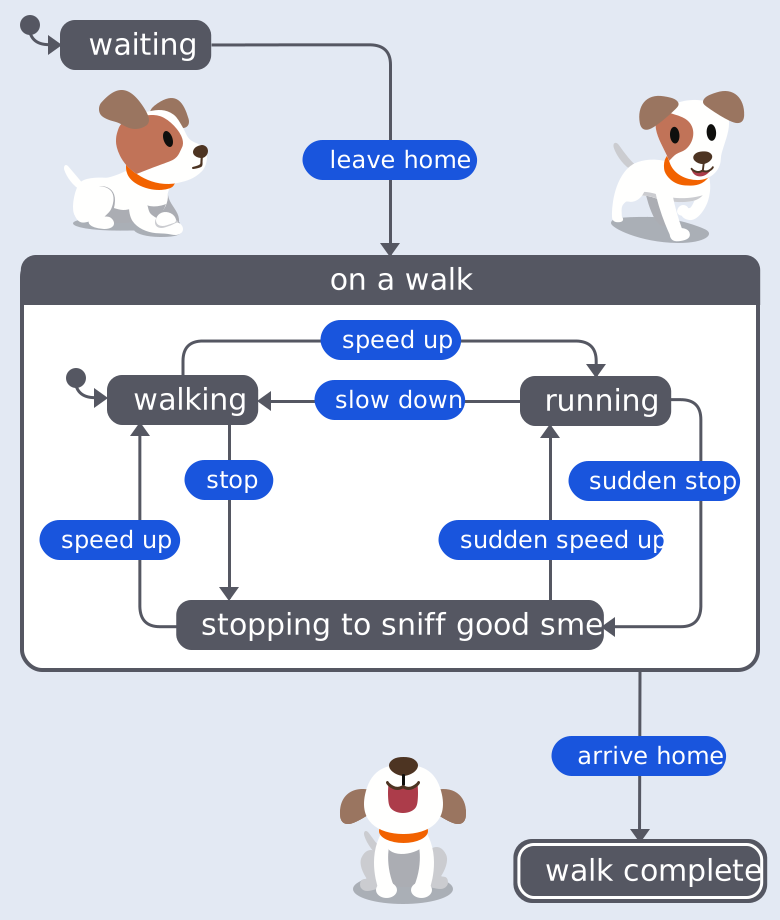
Explore the dog walk with nested states in Stately (sign-in required)
This hosted example is read-only and requires Stately sign-in. The diagram above stays available without an account or if the interactive view cannot load. Open the example in a new tab.
When walking is active, on a walk is active too. In a compound state, one direct child is active at a time. A transition defined on the parent can handle an event that its active child does not handle.
This is useful for shared behavior. A music player's playing state can handle STOP once, whether its child state is buffering or ready. A sign-in flow can handle CANCEL on its parent instead of repeating that transition on every step.
Read more about parent and child states.
Parallel states: describe things that happen together
A dog can walk and wag its tail at the same time. Walking versus running and wagging versus not wagging are separate questions.
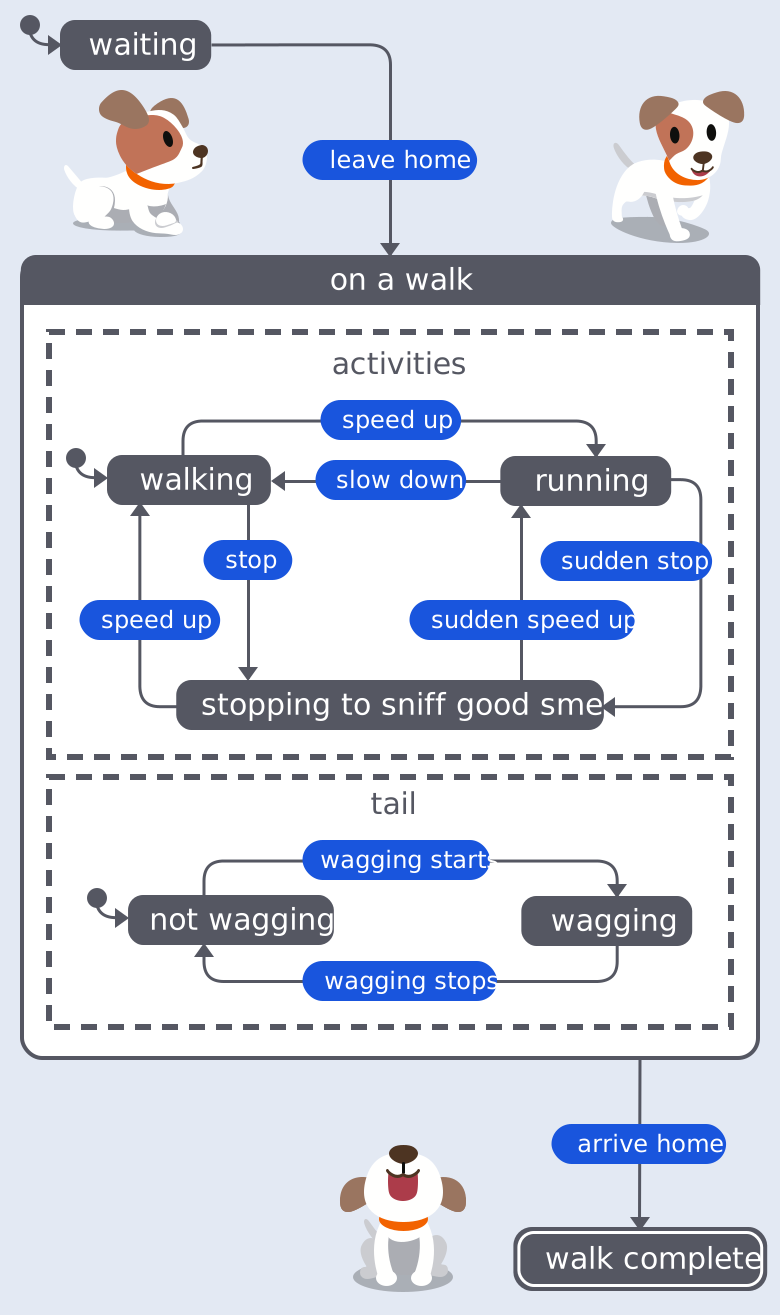
Explore the dog walk with parallel states in Stately (sign-in required)
This hosted example is read-only and requires Stately sign-in. The diagram above stays available without an account or if the interactive view cannot load. Open the example in a new tab.
Without parallel regions, you might draw walking-and-wagging, walking-and-not-wagging, running-and-wagging, and running-and-not-wagging. Add another independent behavior and the combinations grow again.
With parallel regions, you describe each behavior separately. All regions are active while their parallel parent is active. That is logical concurrency; it does not mean the program runs each region on a separate thread.
For a checkout, payment and inventory reservation might run together. Each region can reach a final state. The parallel state completes when all its regions have completed. You still need to decide what happens if payment fails after inventory has been reserved.
Read more about parallel states.
History states: return to where you left off
Suppose a checkout has address, delivery, and payment steps. The customer opens help while choosing delivery. When they close help, you want them to return to delivery.
A history state remembers the previously active child state of a parent. A transition back through history restores that state instead of always starting at address.
Shallow history remembers the parent's direct child. Deep history also remembers active descendants, including the active states inside parallel regions. History needs a default for the first visit, when there is nothing to remember.
History is part of the statechart's behavior. It does not, by itself, save a session to a database or restore a process after a server restart. That requires persistence.
Read more about history states.
Statecharts in JavaScript and TypeScript
You can execute a statechart with XState. Here's a loading flow with success, failure, and retry behavior:
import { createActor, createMachine } from 'xstate';

const requestMachine = createMachine({
  id: 'request',
  initial: 'idle',
  states: {
    idle: { on: { FETCH: 'loading' } },
    loading: {
      on: {
        RESOLVE: 'success',
        REJECT: 'failure',
      },
    },
    success: {},
    failure: { on: { RETRY: 'loading' } },
  },
});

const request = createActor(requestMachine).start();
request.send({ type: 'FETCH' });
request.send({ type: 'REJECT' });
request.send({ type: 'RETRY' });
console.log(request.getSnapshot().value); // 'loading'
This example models the request's lifecycle. It doesn't make an HTTP request. Your application sends RESOLVE or REJECT when the request finishes, or you can invoke a promise actor to connect the request to the machine.
The same behavior can be a diagram you discuss with your team and code you run in your application. Start with the XState quick start when you're ready to connect the model to code.
More state chart examples
Authentication with two-factor verification
A sign-in flow might move through entering credentials, checking credentials, entering a verification code, and signed in. The authentication parent can handle CANCEL across its steps. A rejected password returns to credentials; an expired verification code returns to code entry. Signed in is reached only after the required checks succeed.
That last rule is worth testing. A diagram that lets an expired code reach signed in describes a bug just as clearly as correct behavior.
An approval workflow
An expense report starts as a draft, moves to awaiting approval, and ends as approved or rejected. A rejection can return it to draft for changes. An approval guard can check the approver's limit. A timeout can move an overdue request to escalation.
The statechart makes unanswered questions visible. Can a submitted report be edited? Can an approver approve their own expense? What happens to an approval that arrives after cancellation?
An AI agent with a tool loop
An agent can move through deciding, calling a tool, evaluating its result, and responding. A tool failure can enter retrying. A request to spend money can enter awaiting human approval before a tool call is allowed.
Model the stopping conditions too. Limit retries, define what happens when the budget runs out, and make cancellation available while work is in progress. The statechart describes the allowed control flow. It does not make a model's answer correct or prove that an external tool performed its side effect.
Read about the actor model for systems where several agents or services communicate by sending events.
Statecharts, state machines, and flowcharts
A finite state machine describes a finite set of states and the transitions between them. A statechart adds ways to organize that behavior, especially hierarchy, parallel regions, and history. You can express a finite statechart as a flat state machine, but the flat version can require many more states and repeated transitions.
A state diagram is a drawing of states and transitions. A statechart is a particular kind of behavioral model that can be represented by such a drawing. Not every diagram with boxes and arrows defines statechart behavior.
A flowchart often describes a sequence of steps and decisions. A statechart makes the current state and its response to events explicit. If you're documenting how to submit an expense, a flowchart may be enough. If you're specifying what happens when an approval, timeout, cancellation, or edit arrives, a statechart is useful.
Statecharts also describe workflows, but a diagram alone is not a durable workflow runtime. Retries, persistence, delivery guarantees, and external side effects depend on the system executing the model.
Where statecharts come from
David Harel introduced statecharts in his 1987 paper Statecharts: A visual formalism for complex systems. Hierarchy and concurrency let a model express related and independent behaviors without repeating every combination in a flat diagram.
Statecharts have several implementations and semantic variants, including UML state machines and SCXML. Check your tool's rules for event processing, transition priority, and history when moving a model between implementations.
Make your own statechart
Start with something your software already does. Name its states, write down the events it receives, and decide what each event can do in each state. Include failure, retry, and cancellation paths.
Add nested states when several states share behavior. Add parallel regions when behaviors can vary independently. Use history when returning to a previous state is part of the requirement.
Open the Stately statechart editor
to draw a model, or
try the sample simulation without an account
. Sign in to create and edit your own machines.
For the broader introduction, read state machines and statecharts. For implementation details, read the guides to states, transitions, guards, and actions.